Showing posts with label google apps. Show all posts
Tuesday, November 29, 2016
Live student agenda
A practice I've been doing this year that I've found really helpful for students is updating a live student agenda that is displayed on the board and shared with students. I use the same Google Presentation for an entire unit and just update the first slide to be the current day agenda. I move old agendas to the bottom of the presentation for reference and use for next year...assuming most things are similar for next year.
I push the agenda out at the beginning of the unit through Google Classroom and encourage kids to bookmark it. It sets up a flow for the day and I try to be as visual with what is displayed as possible. All activities referenced for kids are live links and take away the hassle of what they need to be doing next. I use emojis in class to hint at expectations (teacher led, working as a class, ticket out the door, extension).
In the slideshow I'm also having slides for essential class notes (in case a student is absent...or didn't write down what I asked them to a few days back) and a rolling list of the main practice activities that should be completed up to this point.
Tuesday, February 25, 2014
#codemaths: algebra functions and image URLs
I've added some function (for my own benefit really) that saves time in anticipating many scenarios in generating random questions--reduce() and coeff() functions using the #codemaths application.
When used, the reduce function can simplify fractions. For example, for random variables a and b, reduce(a,b) would simplify a=4 and b=1 to 4 and a=2 and b=4 to 1/2. It is still your job to make sure b is not zero with the constraints.
The coefficient function allows expressions to be simplified--most helpful for anticipating the best final answer. There are some specific options to differentiate how it is used.
When used, the reduce function can simplify fractions. For example, for random variables a and b, reduce(a,b) would simplify a=4 and b=1 to 4 and a=2 and b=4 to 1/2. It is still your job to make sure b is not zero with the constraints.
The coefficient function allows expressions to be simplified--most helpful for anticipating the best final answer. There are some specific options to differentiate how it is used.
If I have the expression ax+by=c using random values for a,b and c (again making sure 'a' and 'b' aren't zero in the constraints), if I use the coeff function I can programmatically simplify the scenario 1x+-4y=5 to x-4y=5.
To code it you need to use "lead" for a coefficient like a that is the lead coefficient in the expression and "constant" if a term you want to simplify is just a constant term with no variable.
In the example above you would code <coeff(a,"lead")>x<coeff(b)>y=<c>. In this case you don't need the "constant" or coeff fuction for c. The equation 1x+-1y=3 would simplify to x-y=3.
That could be used in this example however: ax+b=c: <coeff(a,"lead")>x<coeff(b,"constant")>=<c>. The equation 1x+-1=3 would simplify to x-1=3.You can also now use a url of an image to be included in a question such as this one:
Wednesday, February 12, 2014
Displaying student work (quickly and for free)
For the past year I've wanted to get Air Server going in my classroom but due to circumstances out of my pay grade I am not allowed to make it work (well) in my classroom. A week or so ago it occurred to me that there was a simple workaround I could be using that may actually work better.
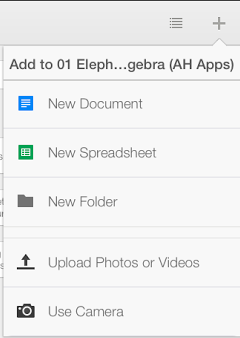
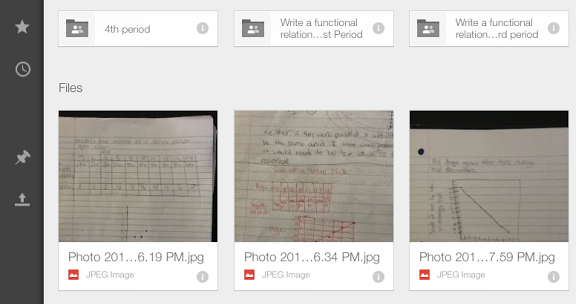
I have Google Drive's app on my phone and iPad and there is an option to take a photo and add it directly to a folder. I have a folder in my Google Drive titled "Student Work". When I see student work that I want to discuss with the class I navigate to that folder in my app, select "Use Camera" in the new document menu and I'm on to the next student.
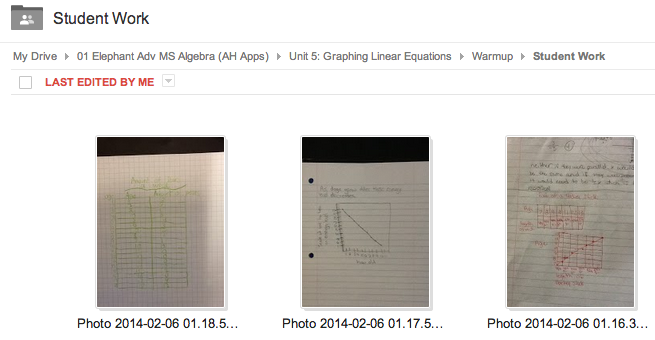
When we are ready to regroup I have that folder displayed on my projector and can easily annotate on them when needed through my computer software.
![]() |
| Add a new file menu |
I have Google Drive's app on my phone and iPad and there is an option to take a photo and add it directly to a folder. I have a folder in my Google Drive titled "Student Work". When I see student work that I want to discuss with the class I navigate to that folder in my app, select "Use Camera" in the new document menu and I'm on to the next student.
![]() |
| View from within the app |
When we are ready to regroup I have that folder displayed on my projector and can easily annotate on them when needed through my computer software.
![]() |
| View from my computer |
Saturday, November 9, 2013
Entry level point for using programming in Algebra!
After working with kids last Friday I left school thinking that maybe there is a way to get them into the idea of constraints, if statements and random variables without them having to do so much messy work early on. I'm working on making a web app that will let them enter only the constraints, variable expression, solution and worked out feedback when someone answers the question wrong. A problem I'm currently having is how to also allow for <a+b> to be replaced by the sum of the variables a and b. Right now it will only replace <a> with the variable a, etc. It does work and I am going to be working with kids this week on it. I'm pretty excited about this--it seems like a good way to integrate early JavaScript skills with my algebra class. What I see coming in the near future is evaluating expressions within sentence and making it a little more visually appealing. Here it is if you want to try it out so far.
Friday, November 8, 2013
Applying student learning to writing code
Today in class I worked with a small group of kids on applying Google Apps Script concepts to some basic algebra that they have learned in the past. I have not done anything like this before with students so I am beginning to think through some of the pieces that they will need to know. I am getting their feet wet by using the same computer generated practice template that I've been using to provide practice for students in my algebra classes.
Please know that I am not completely going computer math here--this is just what is used for the practice and remediation cycle for my students. We are still having class discussions on parallel tasks, open ended questions, pulling out algebra tiles and self-assessing our own work and understanding.
Here is a link to a presentation outlining some of the components needed to begin working in it.
Tuesday, October 22, 2013
Computer generated practice
It's out there and I get that. As a teacher I always find that something that is already made is not quite what I'm looking for so I make it again myself. It's a problem I have and I should probably get some help :)
That being said, if you know some javascript I've shared the code for my computerized practice that I've been developing for my algebra kids this year. For those not experienced in javascript this is probably the point where you just stop reading and visit the blog another day...
Click here to get a copy of the script file. I have it set when you click to make a copy in your current Google Apps account.
In the file, go to the questionSet file. The questions in the comments should give a step by step of where to go and what to do.
Basic idea is you can make question sets for students (and I'm hoping to get some advanced students to apply their learning to make their own question sets to share with me). Here is an example of a set of questions.
[Here is a link to the code (specifically in the questionSet file) for the activity.]
I've also put some help slides related to this in my programming track presentation for students here.
Tuesday, September 10, 2013
What's in the bag: Theoretical vs Experimental Probability
If I thought yesterday was boring--what did the kids think?!
Yesterday I reflected on how tragic it was that we talked all day about dice, coins and cards and never had them in student hands. I thought about what aspects of this new class I thought were important and what things could be discontinued (or as Google would put it 'deprecated').
What I want to continue:
Yesterday I reflected on how tragic it was that we talked all day about dice, coins and cards and never had them in student hands. I thought about what aspects of this new class I thought were important and what things could be discontinued (or as Google would put it 'deprecated').
What I want to continue:
- Student self-reflection based on learning target rubrics on a semi-daily basis
- Activities and labs centered on the learning targets (ideally incorporating multiple targets)
- Short, meaningful yet challenging applications of the learning
- Computerized practice and resources for kids that need it
- Video lessons
- Notes packets
- 'I do, you repeat' cycle of examples
Sunday, August 4, 2013
Order of operations practice with feedback
My summer hobby has turned out to be learning more programming. I want to try and create some practice for students in areas that I anticipate will need more practice. One of those earlier topics being the order of operations. Now that I have the code put together I think making future practice exercises will go much quicker. On the programming side I learned this time around how to have help text appear within the textbox and then disappear when clicked--something I wish Google forms would integrate *hint, hint*
Here's the link to the practice. There are seven question types, chosen randomly. If there is another you want me to add write it out in the comments below and I'll get it in there.
Here is a link to the code file.*Disclaimer: rather than program a solution for division by zero I just made sure not to have any questions that would have that occur. When using division in expressions I didn't want crazy decimals so you'll always see division by 2.
Saturday, July 13, 2013
Course resource display manager for students
What is it?
I think I have put this together in a way that should allow for others to duplicate this for their own classroom. My goal was to allow students to locate resources for class simply by typing in an input box and the available resources would be filtered in real time. I could also see including items in the list that are not links like extension questions for students to think about. Links that are included could also be from various sources (not just YouTube) like Google presentations, related websites, links for electronic quizzes, etc. I've also tried to put it together in a way that allows collaboration where anyone with access to the form link can submit resources at any time and they will be included automatically in what is displayed.
*In making some changes to standardize this it is possible there may be an error in my code. Please let me know in the comments if you've followed the steps below and it doesn't seem to run.
Here is how to get started:
1. Click here to make a copy of the template.
2. Open the spreadsheet (or view responses if you are looking at the form) and copy the spreadsheet key ID:
The Key ID is the portion of the web address of the file you are wishing to copy between the key= and the # symbol:https://docs.google.com/spreadsheet/ccc?key=0ApfEUqF5qtzJdEh2QndSWGk5cG44RVNjUWhSR3ZPSUE#gid=33. From the Tools menu click on Script Editor, in line 8 replace the text "Spreadsheet key goes here" with your copied spreadsheet ID (with quotation marks around it like this "1234ASDFSAWEFSADFnf" for example).
4. Click the Publish menu and then "deploy as web app".
5. Save a version number (give it a name of some sort when prompted).
5. Set it to execute by you (says 'me' and then your email address) and then set access to the app as 'anyone, even anonymous'.
6. Finally publish it and then share the current link that appears to allow others to access your class resources.
Notes:
- Clicking on a column header will sort the table of resources by that column.
- Columns B through E all need to have entries in them for the app to display without error and I don't think it will run into you have at least one row of resources entered in.
- Feel free to tweak this for your own needs if you are feeling brave with javascript code.
- You could create an ifttt.com recipe that sends new YouTube upload links and info to a Google spreadsheet (could even be this spreadsheet if you set it up correctly).
Tuesday, June 25, 2013
Using coding to think deeply in math #codemaths
What led me here...
I write this in hopes of what the next year will look like for my students in Algebra. I find the more that I learn to write code the more important it is that I pass on this skill to my students. Perhaps with daily access to Chromebooks and Google Apps Scripts in their Google Drive that will look like building extension activities parallel to the algebra we are learning in class that will also teach the code skills to my students.In writing some of more own programs I feel that I've had to think deeply about the mathematics in order to consider all possible outcomes for anticipating errors or situations that may cause the program to break. Last spring I wrote a web app that will take the coordinates (in order) for a convex polygon and identify it (quadrilateral, parallelogram, square, rectangle, rhombus, kite, trapezoid). I had to anticipate what would happen if slopes calculated in the program would be zero or undefined and how to address that situation for the final output. I didn't have students create an actual program but some did choose to make a Google presentation that, through clicked links, would identify what type of a quadrilateral is present at the end by its properties.
Yesterday, while in a workshop on using code to teach mathematics, I decided to dig deeper into my quadrilateral program.
Researching what I thought might be possible
By doing some searching online here and here I found a 'fun' way to calculate the area of any convex quadrilateral using the slope and distances of its diagonals. This was an exercise where using a trig identify was actually necessary! So here is what I found:
You can calculate the area of a quadrilateral (convex) by taking half of pq sin θ where p and q are the lengths of the diagonals and θ is the angle between them.This prompted me to ask the next question:
How do I calculate the angle between two lines using their slopes?Like any good child of the millennial generation I Googled the question I was asking and found this:
θ = tan^(-1) [(m2 - m1)/(1 + m1*m2)]Putting it together as a composite function:
Area = 0.5 pq sin ( tan^(-1) [(m2 - m1)/(1 + m1*m2)] )Considering the range of circumstances
And now I had to think about what this would mean in the program. I know that there is the possibility of having some vertical lines as diagonals (problematic in a program because of division by zero) and also the possibility that a diagonal may be horizontal. I would need to use some if, else if, and else statements to account for this and figure out what to do in that situation. This is where some discovery for me as a math teacher took place:
In the situation of either a vertical or horizontal diagonal I could think of the quadrilateral being split by it, creating two triangles and finding their area by multiplying the length of the vertical/horizontal diagonal and then the difference in either the x coordinates or y coordinates respectively of the other diagonal (basically the altitudes of the two triangles added together). The horizontal diagonal wasn't really problematic in the program but I thought the connection to the vertical diagonal process was interesting.
In the situation of a vertical and horizontal diagonals this would create perpendicular lines causing θ = 90. Since sin 90 = 1 the area calculation simplifies to 0.5 pq which is the formula we teach in Geometry for areas of kites and rhombus (kind of cool to see how all the area formulas are related by trigonometry for me at this point).
For all other quadrilaterals I can just calculate the slopes and distances of the diagonals and use the standard formula above.Converting the math to code
So here is the javascript code for calculating the area of quadrilateral ABCD, for sake of time I'm not going to explain the variables but I'm guessing if you've read this far you can figure it out:
So now to think how to lead students toward learning these same skills...//////////Area of quadrilateral////////////////////if (slopeAC == 0){if(slopeBD =="undefined"){var areaCalc = 0.5*distAC*distBD;}else{var areaCalc = Math.abs(distAC*yDiffBD);}}else if (slopeAC == "undefined"){if(slopeBD ==0){var areaCalc = 0.5*distAC*distBD;}else{var areaCalc = Math.abs(distAC*xDiffBD);}}else if (slopeBD == "undefined"){var areaCalc = Math.abs(distBD*xDiffAC);}else if (slopeBD == 0){var areaCalc = Math.abs(distBD*yDiffAC);} //This condition is not necessary and would be covered in the final else statement but is interesting in how it relates to the previous else if statementelse{var theta = Math.atan(Math.abs((slopeAC-slopeBD)/(1+slopeAC*slopeBD)));var areaCalc = 0.5*distAC*distBD*Math.sin(theta);}
Sunday, February 10, 2013
WiFli Response on YouTube
I've just uploaded a promotional video giving an inside look and a bit of a story line to using the app in my own classroom. Here it is if you want to check it out.
Thursday, January 31, 2013
Wifliresponse: Testing and tweaking phase
Aside from adding some visual elements and minor customizing I have a working product. It is not available yet on the website but I'm shooting for next week. Say tuned...
Big development recently has been a data snapshot tool that allows the teacher to capture a poll result and add it to a recent history graph for the current class data. The system has the ability to identify which class is in session and will load the progress graph the next time the class responds to a poll. Here's a preview:
Subscribe to:
Posts (Atom)