Showing posts with label edtech. Show all posts

Wednesday, February 12, 2014

Displaying student work (quickly and for free)

For the past year I've wanted to get Air Server going in my classroom but due to circumstances out of my pay grade I am not allowed to make it work (well) in my classroom. A week or so ago it occurred to me that there was a simple workaround I could be using that may actually work better.
Add a new file menu

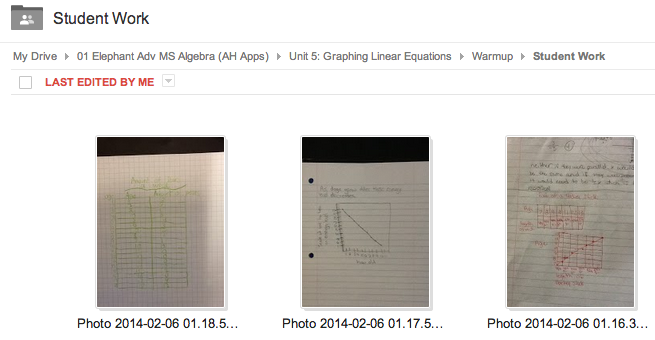
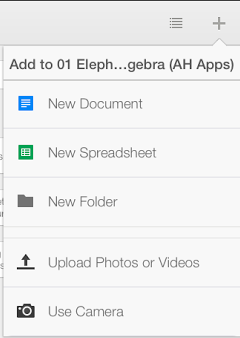
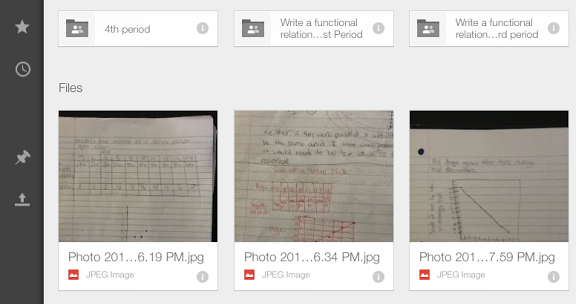
I have Google Drive's app on my phone and iPad and there is an option to take a photo and add it directly to a folder. I have a folder in my Google Drive titled "Student Work". When I see student work that I want to discuss with the class I navigate to that folder in my app, select "Use Camera" in the new document menu and I'm on to the next student.
View from within the app

When we are ready to regroup I have that folder displayed on my projector and can easily annotate on them when needed through my computer software.
View from my computer


Friday, September 6, 2013

Google calendars and html


Embedded classroom calendars
In Google calendars a colleague of mine (Kyle Sellers) discovered that you can actually use html in calendar event descriptions. This is great for use in an embedded classroom calendar for daily classroom activities for parents and students to check out. They can subscribe to the calendar and have important class details and resources only a click away.

Some key html help for those new to it:

Links
To make a link like mine above you would use this code in the description you type for that sentence:
We looked at the <a href = "www.mrschwen.blogspot.com">classroom website</a> in class and the information that can be accessed there. [You would want to edit the text in blue to say what you want.]
Formatting
To make that same link bold and underlined you could add in <b><u> in front of the text and </b></u> after the text like so:
<a href = "www.mrschwen.blogspot.com"><b><u>classroom website</b></u></a>
The <b> turns on the bold formatting and the </b> turns it off. Otherwise all the following text would become bold.

Monday, March 25, 2013

WiFli User Instructions


WiFli Response
Teacher instructions--3/22/2013

Installation

  1. Purchase from the wifliresponse.com website for $5
  2. Follow the installation process instructions while signed in to the account you plan to use the app with (make sure you are not signed in to two Google accounts within your browser as this may cause problems)
  3. You will receive a confirmation email with a direct link to the app once installation is complete

Daily Use

  1. Open the web app using a direct link, from wifliresponse.com or install the Chrome app.
    1. Note: Since this app uses Google Apps, Chrome will most likely deliver the best experience. Internet Explorer has been known to cause issues for some users.
  2. Start a question: The question itself will not be present within the app, only the answer choices (Options are A-G, Yes, No, Unsure or Other (which allows for single word or numerical response). The question will be asked aloud by the teacher, displayed on the board or on a handout in class. Confidence level and a free response options are also present within a question to allow for additional information to be collected for teacher use.


  1. If a question is open ended, leave the Set Answer box blank, otherwise enter a correct answer in the box prior to starting the question. 


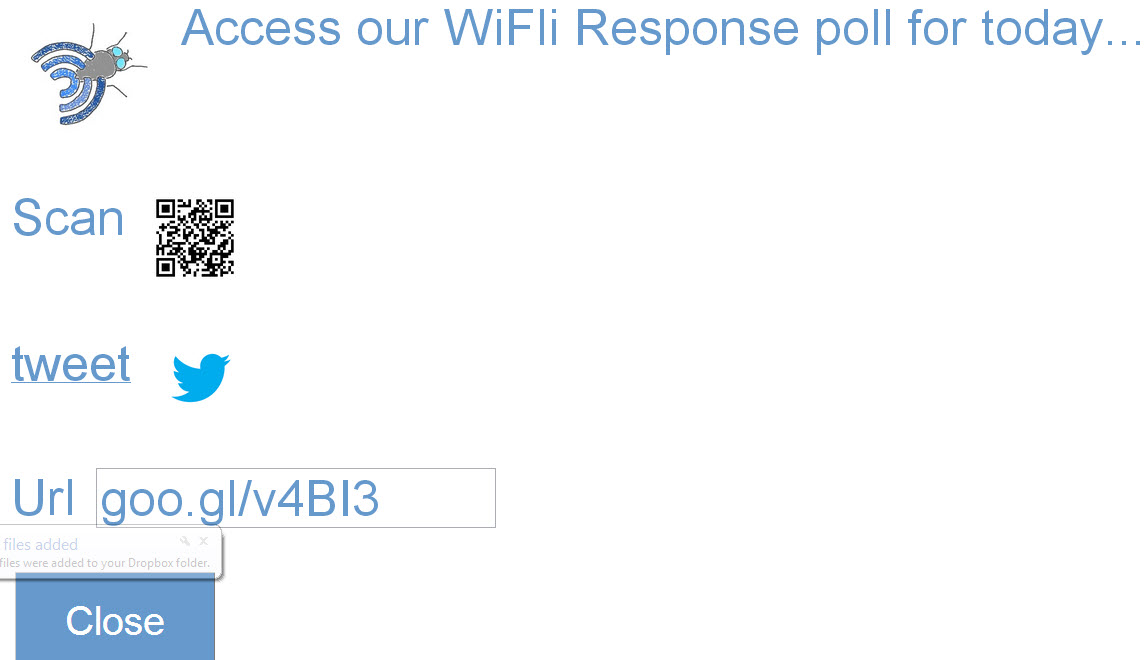
  2. Share the response form with students on screen by clicking the Share button or embedding a link in your class resources. Clicking the Close button will return the user to the app. The Share screen allows for students to access the poll by shortened URL, an instructor tweeted link or scanning a QR code. The link is permanent for each teacher user and will not change with each poll. Students can bookmark the link on their own devices as well.
  3. Sort results by name, filter responses by answer choice or confidence level, or view only correct/incorrect responses.


  1. Seating chart: This can be helpful for a starting activity to group students by small groups, learning partners or other targeted interventions.
    1. Click on the Spreadsheet icon in the app and then click on the Seating Chart tab of the sheet. Follow the instructions on screen to set up a seating chart format. You will need to authorize the script the first time and then click it again to run it.
    2. Sort your current question data by a given category by clicking on the yellow cell and selecting (by confidence, answer, or correct)
    3. The chart will update for each class and each question that is asked. If you want to save a chart arrangement, use your computer’s software to do a screen capture.


  1. Response History
    1. At any given time the past 10 questions in history can be viewed within the app. To do so, click on the “1-recent” list and select a different value. Selecting 2, for example, would display the question that occurred before the current one.
    2. Click on ‘Go’ when you are ready to view the selected data.


  1. Class lists: Add your students, by class, to enable class data capture and identify students who have not responded
    Click the student icon in the web app. Follow instructions on the class list spreadsheet page
    Update class list periodically 
    The class list is used mainly to identify who has not responded and to identify what class is currently submitting. With a class identified you can actually save data points per class to a progress graph (probably something I should mention on the instructions page). The class list is the names that it will use to search for in student entered names on each response. Most of my class list names entered are just last names since it works off of a search function the list name needs to find itself within a student name entered. In other words if I have 'Schwen, Andrew' in my list and the student enters Schwen, Andy it will not identify them as submitting. If my list has just 'Schwen' both entries (Andrew and Andy) would be picked up. 

Thursday, March 7, 2013

WiFLi Response in the Chrome App Store

Those that purchase WiFLi Response on the website can now download and install a Google Chrome App to display in your browser's New tab for easier access. Here is a link to the listing in the Chrome Store. I'm pretty excited to offer this new feature!

Sunday, February 10, 2013

WiFli Response on YouTube

I've just uploaded a promotional video giving an inside look and a bit of a story line to using the app in my own classroom. Here it is if you want to check it out.

Thursday, January 31, 2013

Wifliresponse: Testing and tweaking phase

Aside from adding some visual elements and minor customizing I have a working product. It is not available yet on the website but I'm shooting for next week. Say tuned...
Big development recently has been a data snapshot tool that allows the teacher to capture a poll result and add it to a recent history graph for the current class data. The system has the ability to identify which class is in session and will load the progress graph the next time the class responds to a poll. Here's a preview:


Friday, October 26, 2012

Using teachem for teachers and students

So I spoke with David Schnurman today about his teachem website that has quickly become one of my favorites. The site came just at the right time for me as I was finding a need for wanting students to interact more directly with some of the video resources I'd shared with them online. Basically the site allows me to embed a YouTube video and has notecards that snap to points within the video timeline and highlight as the video moves forward. Some of the cards I use to highlight information but I've found it to be a good way to extend what is said in the video and ask questions of the students as well. I can also provide feedback or a sample answer on the back of the card for them to view to check their thinking.
I'm sure I'll post more on how I'm using this soon but for now I've made a teachem school that I'd like to push some of my technology tutorial videos to for helping other teachers that are trying to use some of the templates I've shared. For those of us with YouTube blocked in our school buildings, it is a resource that our students will have to utilize at home for the time being.

Friday, June 15, 2012

QR code scripting

Last night I discovered while playing with the url shortener API in Google scripts that once a URL has been shortened using the goo.gl address, if you add ".qr" to the end,  it will open up the associated QR code.
For example http://goo.gl/E8i5x vs http://goo.gl/E8i5x.qr
With this new discovery this morning I have added it in to my course management system so now when a user creates an assessment not only does it send the form link to a unit table of contents, it will also send an inline QR code as well for students. I see this as being helpful for students accessing the form quickly and for a teacher being able to copy that image and place it directly on a paper copy of the test. The form links are now also paragraph items rather than list items which I think should help if the user wants to edit the text later. For users of the course management system this update is applied for all future units created.
Listen to how nerdy I've become...

Tuesday, May 29, 2012

Course Management System


Click here to get started with directions and relevant links.
Click here to get Alex Vanyo's AppleScript App that allows for copying and pasting into a web-based grade book as seen in the video. You can also access a PC Java version on his newly launched website piquy.net. He's also shared some other projects he's completed on the site as well. My favorite is the programming he used to create a Google Map region and identify a location based on an entered address.

Wednesday, May 23, 2012

Script run time limit in Google Apps


I had high hopes for being able to share my work with another colleague teaching the same course next year. I have a script all ready to go that in theory should copy all my Google Forms tests but give them new links, a new integrated class list for them and unit documents with links for their students. It works except for right now Google has apparently set a maximum of 5 - 7 minutes of time a script can run. A few weeks ago the script would just stop and not give any error message. Now it says "Exceeded maximum execution time." I'm hoping this is just temporary but if not don't plan on Google Scripts doing any heavy lifting anytime soon.

Wednesday, May 9, 2012

Math and technology need not be opponents

I'll start off by saying these are my initial thoughts as I'm trying to sort through some encounters I've had recently. To sum it up before I get into it: technology seems to be chosen for us (teachers) by those that aren't in the classroom and avoided by (many) teachers themselves. The people that should be looking for the tools necessary for their own classrooms become so focused on understanding the course material they lose sight of how they will get students involved in learning it.
I recently heard Dan Meyer speak about the tension that exists between our finite resources and infinite tools. The point was not to choose random technology tools just for the sake of using them but to choose the ones that will bring perplexity to our lessons for our students. (His definition of perplexity is presenting students with a problem that they want to solve in which the solution is within grasp). I've had other staff development on making sure the work is relevant and meaningful--there are supposed to be two different definitions for those words but they seem so close I could never keep track of which one meant which...so I'm just going with perplexity now.
Personally I have waited a long time to get instructional technology that would meet a specific need I had in my own classroom. Often the wait got to be so long I either found an alternative elsewhere, making it myself or just continue on knowing there was a better way of getting students involved in their learning.

So here exists the problem as I see it:

1. Those that bring the technology to the teachers don't understand the needs of the teachers in their classrooms. A flashy website subscription just shows up or a single-purpose device gets delivered over the summer that's outdated by the fall. Technology acquisition should be driven by what teachers want and need to meet a need already present in their classroom. We need to move away from purchasing tools and then asking how they can be used in a classroom. Technology tools need to be driven by curriculum and not the opposite. The tools need to help us dive deeper into our content area, not to make it cute or the same old thing just wrapped in colorful paper.

2. Curriculum departments need to stay informed. We can no longer accept as educators to be behind 3+ years in implementing and teaching technology use with our students. There are tools that exist that can bring a level of deep thinking and individualized instruction to our students that were not possible even 5 years ago. Leaders need to be aware of these tools, modeling them and asking what effect this can have on our current practices. A great springboard for me with idea sharing has been learning from other talented educators and leaders on Twitter.

3. Move beyond single use devices.   iPads, iPods, Kindle Fire, Nook Tablets, etc all  have one thing in common: multiple use device for classroom applications. The problem is education vendors want us to believe we still need to purchase single use devices (that are obsolete in 3 years which ironically is about how long we have to work to get them in the first place). The ACT and SAT could have been computerized years ago but this would sell fewer graphing calculators. Seriously how many computer labs sit empty in schools on a Saturday morning? Make an electronic graphing calculator  that connects to a computerized test, maybe even let kids choose which brand they want in the test so that we can start getting better calculator apps on their devices (Texas Instruments and Casio I'm talking to you here...). Until this happens our view of technology in the classroom will continue to move too slowly. I do not want to have to connect my calculator to my computer to load a picture on it taken with a camera when I could take a picture with the same device that has the calculator.

Final thought (for now): I don't consider myself to arrived at some conclusion with all of this myself. I don't know how to fix it right now but I do hope that as educators we start to have these conversations. We can't allow ourselves to reach a point where we think we have it figured out and cement ourselves in at that location for the rest of our career.
Tuesday, April 17, 2012

Send students email results with one click

I am presenting on some Google tools I've made and use in my own classroom and share through this blog at the Flipped Conference 2012 and have set out to make the setup process easier for all teachers.
Background info if you care: In the past month or so I have set out to learn how to use Google Scripts. The documentation is written for the non-programmer in mind (although I found having taken a college computer science class 13 years ago helpful) and offers MANY examples of how to implement specific functions. Basically anything you can possibly imagine in Google Apps can be done through the functions present there.
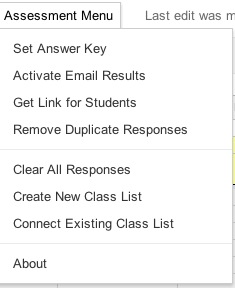
An update I've made to my templates is to now allow instant email results be activated from the menu rather than myself or others having to follow some tech-savvy like instructions. Here's two images of the menu, before and after the email trigger has been set:


Another feature I'm currently testing is course level table of contents creation, including folders and test filing in course and unit folders. I have it working but want to make sure before adding that to the public template. My vision on setting out with this update was that teachers would never again have to enter in a spreadsheet ID number, copy and paste answers or manually gather test links for students. (In presenting the material to other educators that always seemed to be the step that was the most difficult to follow. )They will still have to collect and give access to other course materials and activities though...

Thursday, April 5, 2012

Flipped instruction: A cohesive classroom technology plan

I've been thinking lately about what moved me towards flipped instruction in my classroom. From the start I was always a teacher that tried to use technology to assist in my instruction, most likely influenced by watching every episode of Star Trek: Next Generation in high school.
As a teacher I try to not be so random in the structure of class. Each activity, each lesson should have a purpose and too often I don't think education approaches technology in the same way. We are continually thrown random tech tools that are "cool" or "interesting" but never shown how to put such tools together in a way that makes sense or is helpful for students. I believe that #flipclass is a community of educators wrestling with cohesion of technology in a classroom. I'm not saying it's the only one, however if you're skimming you probably won't catch that.
We aren't just about videos, we (hopefully) still wrestle with what current educational best practice is telling us but in general it seems we are looking for a technology plan that makes sense for our classroom, that is efficient, saves us time and maximizes learning for our students.  It does take time but then again doing anything well in life will.

Wednesday, April 4, 2012

Scripts for edtech companies should be easy, right?

So I keep trying to go the traditional avenues in addressing the problem I have as a teacher with wanting to do something seemingly easy with our online grade system. No one seems to understand what I'm asking so I'll blog it instead and maybe someone can tell me "Yes, that should be easy!" or "Actually you have no idea what you're talking about, it'd be way more difficult than you think."


Here's the problem:
Our grade system does not accept spreadsheet clipboard data to be copied into it. Their website states "Because it is a webpage it cannot behave like a spreadsheet." (Unless of course you've heard of Google.) However a third party assessment site we also use has written a plugin that automates that process for entering scores into my class--unfortunately that's only when I want to transfer scores from that assessment site.

Here's what I'm thinking the grade site could do and you can let me know if you think it's possible:

  1. I know there are script commands that can access clipboard data, so a teacher could copy their scores to the clipboard using a menu or command-c key combination.
  2. On our grade book site, the teacher could click in the first student grade cell and click a button on the site that would run a script (would only work when no grades have already been entered)
  3. What I think the process could be:
Count array data on clipboard and make sure it matches the current class size
Do a loop that alternates between entering in values of the clipboard data and down arrow key strokes 
I'd love to hear your thoughts on this. 


Since writing this post, one of my 8th grade students, Alex Vanyo solved the problem for me by researching and writing a program in AppleScript (Mac). He is close to completion on one in Java as well (PC). (click here to see more)

Friday, March 30, 2012

My Flipped Class April Fools Joke: How (not) to do #flipclass


I got the idea to make this when my daughter was playing with a Magna Doodle. Thinking about how funny it'd be to make a math course video using a Magna Doodle I made this parody of how I flip my classroom.

I try to address the fear that by flipping my classroom I'll eventually be replaced by computers, the internet or...robots. (Which if you're a big Battle Star Galactica fan you might actually believe...)

For those that don't catch my sarcasm or twisted sense of humor in the video, I do not really approach my flipped classroom in this way, my process for recording videos is far less complicated and I still work with students in person.

Again, in summary:
1. This video is not serious
2. I am not being replaced by robots
3. My wife says my sense of humor is weird

Happy April Fools Day!

Saturday, March 10, 2012

Class list integration is now automatic!!


 So my wife is gone tonight which translates to me having all evening to learn more about Google Apps Scripts. I found some new functions tonight that should help new users of my template to be able to create and connect a class list file with nothing more than a menu selection.(Reduces one page of directions down to one click!) Users who download the template can now set up their class list by selecting "Create Class List" in the Assessment Menu. It will automatically create a spreadsheet titled "Class Lists" and connect it to the assessment template by its Key ID. (Teachers will still have to edit the class list with their student names.) The first row will be the class titles and it will accommodate up to 10 columns of student lists as before.
Very excited about this. Very excited.

Friday, March 9, 2012

Scripts: Knowing just enough to be helpful or dangerous?


First of all, there really isn't a chance that the script I've put together is 'dangerous' but the title is at least catchy if you're reading this. I've benefitted a lot from the MCQ and Remove Duplicates scripts created by Romain Vialard in the Google Apps Script gallery. I have always had them included in the templates I've shared but I have now put them together in one script and added a menu function that should load when you download the newest templates. (Click here for the script if you want to install it yourself on a template you already have.) I know very little about scripts and programming but was pretty good at piecing together html in the late 90's so this felt pretty similar to that.

The menu will allow you to clear all past student submissions, remove duplicate entries in one click, get the form url and also get the spreadsheet key if you're using one of my shared dashboards. I have the "Clear All Responses" option at the bottom because that wouldn't be good to accidentally click that one. I'm excited about having an integrated menu and hope that it adds some user-friendliness to the whole process.

If anyone knows how to set a trigger (see more here) from the menu or change this script so that a trigger is automatically set to run the 'sendemailonformsubmit' function that would be a huge help for many uncomfortable with setting a trigger. I'm not even sure if it's possible at this point.

If you're interested in collaborating on this it'd be really cool to have the email reports look more like the individual student results tab in the spreadsheet when they're sent out but that goes beyond my skills at this point.

Thursday, January 5, 2012

Flipped Class: Building connections, small groups and customized learning.

I love my job if I haven't made that clear in earlier posts. Don't get me wrong, there are still difficult moments but today has proven to be very encouraging. I'm a year into a fully-flipped classroom with my Geometry students and I had another moment today that encouraged me in my walk.
I've developed a student response system, WiFli Response,  that I've begun using for my attendance process in class (no seating charts since students are moving about constantly based on their learning activities).
The response system presents students a generic form that can be used to collect and display for me some graphic data instantly: 1) Who has not responded--both absent and off-task students; 2) Confidence level on the given objective; 3) Response to a specific question; and 4) Any additional comments they'd like to add.
This week I've presented these questions at the start of class and ask students to submit their answers prior to the start of class using web devices and our wifi network:

Submit your attendance on your iPod today.
1. For the question, answer “yes” if you watched all the 8.1 videos and “no” if you did not.
2. Rate how you feel today on a scale of 1 to 5 (5 being amazing, 1 being worst day ever)
3. In the free response section feel free to add anything (appropriate) here that you like :) It’d be helpful to know of any specific Geometry help you’ll need today too.
I've truly enjoyed some of the additional comments students are willing to give and it helps me in knowing who to connect with on a more individual basis within a class period. Comments from having no sleep last night, feeling overwhelmed, personal issues, or my personal favorite today:

My rabbit chewed up one of my books past night! GOod thing I got a kindle
After attendance, based on how students answered the questions I worked with a small group of students in the front of the room who were needing some extra assistance. Class started with them feeling completely lost and ended with them reporting much higher confidence in the material. Because of the flipped class nature, the remainder of the class did not have to wait to learn new material--they were able to move on to the next lesson.

Thursday, December 29, 2011

WiFli Student Response System

In conclusion to my Open letter to an edtech company series (here and here) I've launched a website this week that releases my own student response system: WiFli Student Response Sytem (www.wifliresponse.com) The platform is cloud-based and works through Google Forms and Spreadsheets. For access, the system relies on either student owned or classroom sets of computers or other web-enabled devices.

Dashboard View

The cost is considerably less than some of the fees being charged by other edtech companies (less than 1%) and I feel that the data returned is much more useful in directing immediate classroom instruction for individual and groups of students. Another positive in my mind is that it does not rely on a third-party (besides Google anyway) to run and you will own the student data in your own personal Google account.

The results are integrated into a single-view dashboard appearance with data filtering options, student confidence level and overall correct percentages (see image above). Within the dashboard there is a history of 10 questions that can be seen for after class reflection by the teacher. No editing is required by the end-user but there are some options available like integrating a class list to show who has not yet responded--it can also detect which class is submitting answers and unlike other web-based student response systems the teacher has the option to set the correct answer in the question set.

I've priced it at $5 for a single user trying to keep it comparable to an app price. The cost is a one-time fee and only needs to be payed by the teacher, the students will access it by one link shared for an entire school year. School and district pricing options are also available with a little humor in the pricing for edtech companies.

Thursday, December 22, 2011

Update on Flipclass Student Reflection and Assessment Results correlation

I surveyed my students again after completing another unit of study. I gave the same survey at the beginning of the year with less definite results than what have appeared mid-year in the graph below. I have correlated individual components of my classroom structure with actual student assessment results. Students self-reported their study habits and I asked them to only answer "yes" or "no" to individual questions if it was true 100% of the time in this past unit. It appears the most significant indicators of a successful end of the unit assessment are students that watch every video (0.28 correlation) and students that ask for help in class (0.2 correlation).

There are some positive things to note in the negative correlations as well I believe: 
  • The lower correlation behaviors are all behaviors that would normally be required in a traditional classroom (doing an entire homework assignment, reading the textbook section, taking notes). I see this as students are now able to do what it is they know they learn best with and abandon strategies that simply do not work for their learning style.
  • Outside of class study time reported by students was also low so I believe the flipclass approach is taking a large burden of time off of my students this year and placing the majority of their learning time inside of the classroom (although I wouldn't mind if they started studying more at home).
Thank you to all my loyal readers. Last February when I started blogging I never would have dreamed I'd be sitting at nearly 18,000 views today. Happy Holidays!