So today as I was working on making a test for my algebra class I came across a site that had an equation editor...naturally drawing me in of course.
While there for no more than 10 seconds a chat window popped up asking if I wanted any math help. I could have ignored it but I needed a diversion and below is the result.
I was surprised I got as far as I did before they asked for a payment since I started by saying I needed help on a test I was taking...this being a company I know for a fact already makes a lot of money through the educational system.
Showing posts with label education. Show all posts
Wednesday, March 26, 2014
Tuesday, December 3, 2013
#codemaths explained: Made to test and share code easily with students
I've since added some functionality to the #codemaths platform that will allow for easier exploration for students and some quicker editing for me (video). As I move into working with tables and graphs on a more regular basis I wanted a way to be able to display either or both of them in a question without having to recode it each time. Through the use of checkboxes a graph and/or associated table can be displayed alongside a question. I also have it set to automatically provide a link to the code (if a student gets the question wrong) so students can look under the hood of each practice question that I make for them and learn from seeing examples of working 'code'. In this example you can see the use of creating an array and sorting it so that the listbox choices are randomized a bit so the correct answer is not always in the same place.
I've also tweaked the code export a bit to be more stable so it really is just a cut and paste for me to build a question set to be used in the practice part of our learning cycle. This has been a really fun project for me as it has developed. As always I'm trying to take out some of the technical stuff so that it is more accessible to other teachers wanting to dabble in it.
To build question sets using custom code, check out this post.
Tuesday, October 1, 2013
Unpacking a student example of dividing by a fraction
Today in class students were choosing different practice activities for review for our test tomorrow. One pair of students was working on a worksheet that involved dividing an integer by a fraction. This is a topic we have not reviewed yet but that students have learned in past years. As I looked at his work I knew that I wanted him to explain his process to me. As I listened I knew this was something that I wanted to share. While some of his explanation is now based on procedures I really get the feeling that he has a deeper understanding than a student that is just taught to 'flip and multiply'.
In preparation for looking at it in a future lesson I tried to look at what is happening with the mathematics behind his explanation and what to do when a problem addressed is a little messier.
Comments, suggestions and additional strategies are welcome!
In preparation for looking at it in a future lesson I tried to look at what is happening with the mathematics behind his explanation and what to do when a problem addressed is a little messier.
Comments, suggestions and additional strategies are welcome!
Here is the student's work from when he showed the class:
This is my take on what is happening as the student is moving forward with his procedure:
Tuesday, September 10, 2013
What's in the bag: Theoretical vs Experimental Probability
If I thought yesterday was boring--what did the kids think?!
Yesterday I reflected on how tragic it was that we talked all day about dice, coins and cards and never had them in student hands. I thought about what aspects of this new class I thought were important and what things could be discontinued (or as Google would put it 'deprecated').
What I want to continue:
Yesterday I reflected on how tragic it was that we talked all day about dice, coins and cards and never had them in student hands. I thought about what aspects of this new class I thought were important and what things could be discontinued (or as Google would put it 'deprecated').
What I want to continue:
- Student self-reflection based on learning target rubrics on a semi-daily basis
- Activities and labs centered on the learning targets (ideally incorporating multiple targets)
- Short, meaningful yet challenging applications of the learning
- Computerized practice and resources for kids that need it
- Video lessons
- Notes packets
- 'I do, you repeat' cycle of examples
Friday, September 6, 2013
Google calendars and html
Embedded classroom calendars
In Google calendars a colleague of mine (Kyle Sellers) discovered that you can actually use html in calendar event descriptions. This is great for use in an embedded classroom calendar for daily classroom activities for parents and students to check out. They can subscribe to the calendar and have important class details and resources only a click away.
Some key html help for those new to it:
Links
To make a link like mine above you would use this code in the description you type for that sentence:
We looked at the <a href = "www.mrschwen.blogspot.com">classroom website</a> in class and the information that can be accessed there. [You would want to edit the text in blue to say what you want.]Formatting
To make that same link bold and underlined you could add in <b><u> in front of the text and </b></u> after the text like so:
<a href = "www.mrschwen.blogspot.com"><b><u>classroom website</b></u></a>The <b> turns on the bold formatting and the </b> turns it off. Otherwise all the following text would become bold.
Saturday, August 10, 2013
Teacher awards
I ordered some frames online this summer thinking that maybe I'd get around to framing some teacher recognition certificates I had received over the past few years to give myself some credibility on open house night--perhaps to avoid some of the 'you don't look old enough to have been teaching that long' comments.
After placing my frame order I continued to clean out my desk and found some handwritten thank you cards from students. It occurred to me that these are more of an award than the certificates I had intended to frame. It's easy as teachers to lead others to believe what happens in our classrooms (especially if they have never set foot in it) with our words and the image we make for ourselves but you can't fool the kids.
I guess those certificates will have to wait a little longer to see the light of day. I will be displaying the cards in my classroom this year.
Have a great new start to the year everyone!
After placing my frame order I continued to clean out my desk and found some handwritten thank you cards from students. It occurred to me that these are more of an award than the certificates I had intended to frame. It's easy as teachers to lead others to believe what happens in our classrooms (especially if they have never set foot in it) with our words and the image we make for ourselves but you can't fool the kids.
I guess those certificates will have to wait a little longer to see the light of day. I will be displaying the cards in my classroom this year.
Have a great new start to the year everyone!
Friday, October 26, 2012
Using teachem for teachers and students
So I spoke with David Schnurman today about his teachem website that has quickly become one of my favorites. The site came just at the right time for me as I was finding a need for wanting students to interact more directly with some of the video resources I'd shared with them online. Basically the site allows me to embed a YouTube video and has notecards that snap to points within the video timeline and highlight as the video moves forward. Some of the cards I use to highlight information but I've found it to be a good way to extend what is said in the video and ask questions of the students as well. I can also provide feedback or a sample answer on the back of the card for them to view to check their thinking.
I'm sure I'll post more on how I'm using this soon but for now I've made a teachem school that I'd like to push some of my technology tutorial videos to for helping other teachers that are trying to use some of the templates I've shared. For those of us with YouTube blocked in our school buildings, it is a resource that our students will have to utilize at home for the time being.
Tuesday, May 29, 2012
Course Management System
Click here to get started with directions and relevant links.
Click here to get Alex Vanyo's AppleScript App that allows for copying and pasting into a web-based grade book as seen in the video. You can also access a PC Java version on his newly launched website piquy.net. He's also shared some other projects he's completed on the site as well. My favorite is the programming he used to create a Google Map region and identify a location based on an entered address.
Tuesday, April 17, 2012
Send students email results with one click
I am presenting on some Google tools I've made and use in my own classroom and share through this blog at the Flipped Conference 2012 and have set out to make the setup process easier for all teachers.
Another feature I'm currently testing is course level table of contents creation, including folders and test filing in course and unit folders. I have it working but want to make sure before adding that to the public template. My vision on setting out with this update was that teachers would never again have to enter in a spreadsheet ID number, copy and paste answers or manually gather test links for students. (In presenting the material to other educators that always seemed to be the step that was the most difficult to follow. )They will still have to collect and give access to other course materials and activities though...
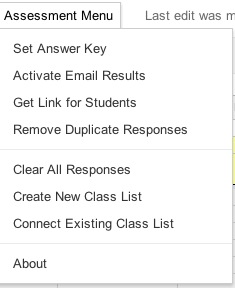
Background info if you care: In the past month or so I have set out to learn how to use Google Scripts. The documentation is written for the non-programmer in mind (although I found having taken a college computer science class 13 years ago helpful) and offers MANY examples of how to implement specific functions. Basically anything you can possibly imagine in Google Apps can be done through the functions present there.An update I've made to my templates is to now allow instant email results be activated from the menu rather than myself or others having to follow some tech-savvy like instructions. Here's two images of the menu, before and after the email trigger has been set:
Another feature I'm currently testing is course level table of contents creation, including folders and test filing in course and unit folders. I have it working but want to make sure before adding that to the public template. My vision on setting out with this update was that teachers would never again have to enter in a spreadsheet ID number, copy and paste answers or manually gather test links for students. (In presenting the material to other educators that always seemed to be the step that was the most difficult to follow. )They will still have to collect and give access to other course materials and activities though...
Thursday, April 5, 2012
Flipped instruction: A cohesive classroom technology plan
I've been thinking lately about what moved me towards flipped instruction in my classroom. From the start I was always a teacher that tried to use technology to assist in my instruction, most likely influenced by watching every episode of Star Trek: Next Generation in high school.
As a teacher I try to not be so random in the structure of class. Each activity, each lesson should have a purpose and too often I don't think education approaches technology in the same way. We are continually thrown random tech tools that are "cool" or "interesting" but never shown how to put such tools together in a way that makes sense or is helpful for students. I believe that #flipclass is a community of educators wrestling with cohesion of technology in a classroom. I'm not saying it's the only one, however if you're skimming you probably won't catch that.
We aren't just about videos, we (hopefully) still wrestle with what current educational best practice is telling us but in general it seems we are looking for a technology plan that makes sense for our classroom, that is efficient, saves us time and maximizes learning for our students. It does take time but then again doing anything well in life will.
As a teacher I try to not be so random in the structure of class. Each activity, each lesson should have a purpose and too often I don't think education approaches technology in the same way. We are continually thrown random tech tools that are "cool" or "interesting" but never shown how to put such tools together in a way that makes sense or is helpful for students. I believe that #flipclass is a community of educators wrestling with cohesion of technology in a classroom. I'm not saying it's the only one, however if you're skimming you probably won't catch that.
We aren't just about videos, we (hopefully) still wrestle with what current educational best practice is telling us but in general it seems we are looking for a technology plan that makes sense for our classroom, that is efficient, saves us time and maximizes learning for our students. It does take time but then again doing anything well in life will.
Wednesday, April 4, 2012
Scripts for edtech companies should be easy, right?
So I keep trying to go the traditional avenues in addressing the problem I have as a teacher with wanting to do something seemingly easy with our online grade system. No one seems to understand what I'm asking so I'll blog it instead and maybe someone can tell me "Yes, that should be easy!" or "Actually you have no idea what you're talking about, it'd be way more difficult than you think."
Here's the problem:
Our grade system does not accept spreadsheet clipboard data to be copied into it. Their website states "Because it is a webpage it cannot behave like a spreadsheet." (Unless of course you've heard of Google.) However a third party assessment site we also use has written a plugin that automates that process for entering scores into my class--unfortunately that's only when I want to transfer scores from that assessment site.
Here's what I'm thinking the grade site could do and you can let me know if you think it's possible:
Since writing this post, one of my 8th grade students, Alex Vanyo solved the problem for me by researching and writing a program in AppleScript (Mac). He is close to completion on one in Java as well (PC). (click here to see more)
Here's the problem:
Our grade system does not accept spreadsheet clipboard data to be copied into it. Their website states "Because it is a webpage it cannot behave like a spreadsheet." (Unless of course you've heard of Google.) However a third party assessment site we also use has written a plugin that automates that process for entering scores into my class--unfortunately that's only when I want to transfer scores from that assessment site.
Here's what I'm thinking the grade site could do and you can let me know if you think it's possible:
- I know there are script commands that can access clipboard data, so a teacher could copy their scores to the clipboard using a menu or command-c key combination.
- On our grade book site, the teacher could click in the first student grade cell and click a button on the site that would run a script (would only work when no grades have already been entered)
- What I think the process could be:
Count array data on clipboard and make sure it matches the current class size
Do a loop that alternates between entering in values of the clipboard data and down arrow key strokesI'd love to hear your thoughts on this.
Since writing this post, one of my 8th grade students, Alex Vanyo solved the problem for me by researching and writing a program in AppleScript (Mac). He is close to completion on one in Java as well (PC). (click here to see more)
Saturday, March 10, 2012
Class list integration is now automatic!!
So my wife is gone tonight which translates to me having all evening to learn more about Google Apps Scripts. I found some new functions tonight that should help new users of my template to be able to create and connect a class list file with nothing more than a menu selection.(Reduces one page of directions down to one click!) Users who download the template can now set up their class list by selecting "Create Class List" in the Assessment Menu. It will automatically create a spreadsheet titled "Class Lists" and connect it to the assessment template by its Key ID. (Teachers will still have to edit the class list with their student names.) The first row will be the class titles and it will accommodate up to 10 columns of student lists as before.
Very excited about this. Very excited.
Wednesday, January 25, 2012
iGoogle: A personal, custom dashboard
Recently I've been frustrated with wanting to embed Google gadgets into a Sites page. You get this really easy script but Sites won't (easily) accept scripts in their pages. As I was playing around in some gadgets I had embedded in my templates, I happened to click on "Add this gadget to iGoogle" and my life changed ( a bit ).
It throws that gadget that I only can view into my personal iGoogle page full of gadgets. Now that I have a dashboard that can pull from various data sources, one gadget can be used to display that data set in iGoogle...this is getting really techie sounding, so let me summarize in teacher language:
Students take a chapter 8 test, in my dashboard (see it here) I set it display student growth from the pretest to the chapter 8 test. Since I have the chapter 8 test selected, this will update my graphs on my iGoogle page. Next chapter, when I change to view the chapter 9 results, my iGoogle page will update as well. You can also make separate tabs to sort your gadgets by function. Most charts in my WiFli Response System are gadgets so I have a tab to view those as well.
The coolest part? You can share an iGoogle page with others (like people that teach the same courses) and they will see the graphs too as long as they have view rights to the data it is displaying--a great visual dashboard for collaborative team discussions. I also have my collaborative team agenda (see a post on it here) set to use gadgets now and those can be included in an iGoogle page as well. Some other gadgets I'm using that aren't mine are a weather forecast, recent google documents feed, gmail inbox and calendars.
Things to note:
By default, the gadgets update every 5 minutes. If you want sooner you can get it down to 1 minute (still better than the 24 hour wait many have to accept by current edtech companies that make dashboards).
Have the tab open you are wanting the gadget to go to. I've had trouble changing a gadget to another tab once it's there.
Thursday, December 29, 2011
WiFli Student Response System
In conclusion to my Open letter to an edtech company series (here and here) I've launched a website this week that releases my own student response system: WiFli Student Response Sytem (www.wifliresponse.com) The platform is cloud-based and works through Google Forms and Spreadsheets. For access, the system relies on either student owned or classroom sets of computers or other web-enabled devices.
The cost is considerably less than some of the fees being charged by other edtech companies (less than 1%) and I feel that the data returned is much more useful in directing immediate classroom instruction for individual and groups of students. Another positive in my mind is that it does not rely on a third-party (besides Google anyway) to run and you will own the student data in your own personal Google account.
The results are integrated into a single-view dashboard appearance with data filtering options, student confidence level and overall correct percentages (see image above). Within the dashboard there is a history of 10 questions that can be seen for after class reflection by the teacher. No editing is required by the end-user but there are some options available like integrating a class list to show who has not yet responded--it can also detect which class is submitting answers and unlike other web-based student response systems the teacher has the option to set the correct answer in the question set.
I've priced it at $5 for a single user trying to keep it comparable to an app price. The cost is a one-time fee and only needs to be payed by the teacher, the students will access it by one link shared for an entire school year. School and district pricing options are also available with a little humor in the pricing for edtech companies.
![]() |
| Dashboard View |
The cost is considerably less than some of the fees being charged by other edtech companies (less than 1%) and I feel that the data returned is much more useful in directing immediate classroom instruction for individual and groups of students. Another positive in my mind is that it does not rely on a third-party (besides Google anyway) to run and you will own the student data in your own personal Google account.
The results are integrated into a single-view dashboard appearance with data filtering options, student confidence level and overall correct percentages (see image above). Within the dashboard there is a history of 10 questions that can be seen for after class reflection by the teacher. No editing is required by the end-user but there are some options available like integrating a class list to show who has not yet responded--it can also detect which class is submitting answers and unlike other web-based student response systems the teacher has the option to set the correct answer in the question set.
I've priced it at $5 for a single user trying to keep it comparable to an app price. The cost is a one-time fee and only needs to be payed by the teacher, the students will access it by one link shared for an entire school year. School and district pricing options are also available with a little humor in the pricing for edtech companies.
Thursday, December 22, 2011
Update on Flipclass Student Reflection and Assessment Results correlation
I surveyed my students again after completing another unit of study. I gave the same survey at the beginning of the year with less definite results than what have appeared mid-year in the graph below. I have correlated individual components of my classroom structure with actual student assessment results. Students self-reported their study habits and I asked them to only answer "yes" or "no" to individual questions if it was true 100% of the time in this past unit. It appears the most significant indicators of a successful end of the unit assessment are students that watch every video (0.28 correlation) and students that ask for help in class (0.2 correlation).
There are some positive things to note in the negative correlations as well I believe:
- The lower correlation behaviors are all behaviors that would normally be required in a traditional classroom (doing an entire homework assignment, reading the textbook section, taking notes). I see this as students are now able to do what it is they know they learn best with and abandon strategies that simply do not work for their learning style.
- Outside of class study time reported by students was also low so I believe the flipclass approach is taking a large burden of time off of my students this year and placing the majority of their learning time inside of the classroom (although I wouldn't mind if they started studying more at home).
Thank you to all my loyal readers. Last February when I started blogging I never would have dreamed I'd be sitting at nearly 18,000 views today. Happy Holidays!
Thursday, July 21, 2011
Hardware instead of Software: A better way to spend our money?
A friend and colleague of mine at a workshop asked the question:
Let me first say that this has been a shift in thinking for me and I am still in process of where this is going.
The place the question has taken me to right now is a problem that I see in my own classroom. I have so many electronic resources available and in use as a classroom teacher but so few ways of accessing them for my students in class. With web resources what they are today, if you can think of an instructional need in the classroom there is probably a tool already out there only a Google search away. What's more is that the product is probably free or very cheap. If I were an educational software company this would make me very nervous, as it should.
What I would love to see is a move toward investing in hardware to access these resources for our students and a move away from finding a digital product for purchase. There may be an amazing super-teacher tool out there but if the tool is only used by teachers I think we are missing the mark of educating our students to be participants in this digital age.
One final question and implication of my thinking: How about we replace textbook adoption processes with technology adoption initiatives instead?
"When will be get past the idea of needing to purchase a product in education to solve our problems?"The question has stuck with me all summer. I've been thinking about it when I go running and each time when I see the latest on Twitter.
Let me first say that this has been a shift in thinking for me and I am still in process of where this is going.
The place the question has taken me to right now is a problem that I see in my own classroom. I have so many electronic resources available and in use as a classroom teacher but so few ways of accessing them for my students in class. With web resources what they are today, if you can think of an instructional need in the classroom there is probably a tool already out there only a Google search away. What's more is that the product is probably free or very cheap. If I were an educational software company this would make me very nervous, as it should.
What I would love to see is a move toward investing in hardware to access these resources for our students and a move away from finding a digital product for purchase. There may be an amazing super-teacher tool out there but if the tool is only used by teachers I think we are missing the mark of educating our students to be participants in this digital age.
One final question and implication of my thinking: How about we replace textbook adoption processes with technology adoption initiatives instead?
Subscribe to:
Posts (Atom)