Showing posts with label professional development. Show all posts

Thursday, April 23, 2015

#codemaths:Programming math practice for students

//Checking in

I feel like I need to start the first paragraph of every post with a quick paragraph for those who will judge my whole classroom based on one blog post (not that anyone has every voiced judgement but I don't want to give the wrong impression either). As part of any good math classroom I believe there needs to be a balance of conceptual development, investigation and then, in turn, developing mathematical fluency and efficiency. This post will focus on how I am using computers to develop efficient math students, and will not focus on the conceptual development that has taken place prior to students doing this practice work (think textbook problems).

//Learning Cycle, Conversations and Self-Reflection

I have chromebooks in my classroom, two students to each device, which I actually love in promoting math conversations and collaboration. If offered one device for every student I'm not even sure that I'd want it as an option...seriously. I've spent many (seriously, MANY) more hours than I care to admit developing an electronic form of practice for my classroom that works for my situation and I feel like I'm at a new place personally, thus this blog post.
A few years back I was doing the traditional assign homework, quiz the students and look at the data myself. Big Data in education, we all know the drill. I had all kinds of charts and electronic analyzing going on but I was doing all the analysis, not the kids, and it was after the learning cycle was to have been completed. There are actually quite a few blog posts and processes I've written on electronic student data that I'm actually not even doing now in my own classroom now.
I dabbled in writing rubrics for each learning target for my students which I really actually liked but, for the sake of time and curriculum development, that has been pushed to the back-burner and saved for a year when my course content has fewer changes. In class we don't have "homework" but "practice" and as it is electronic there is an unlimited amount available to students at any time, along with help videos that are an option for kids wanting to review where we've been.
We have dedicated class time for practice (example here) and it keeps individual learners at the focus rather than the pace of the whole class. I actually think it's tragic to hear that many 12, 13 and 14 year old kids are having to do 3-5 hours of homework every night before bed rather than spending time with their family and I don't want to be a contributor to that any longer.
I've done the whole clicker thing and what I didn't like with that was there was a lot of down-time and waiting and a lot more focus on the right answer than the process and conversations. Maybe that's because we were gathering data and in education we want it to be "valid" and "formative". No thanks, I'd rather have my kids talking about the math they are wrestling with than getting pure data from them.
Properties of Exponents Review

//codemaths

I've written some about this in the past and wanted to highlight some of the changes I've put together. I'm presenting on this at the NCTM Regional Conference in Minneapolis, Fall of 2015 from both a teacher perspective as well as using it as a tool to challenge students to think more deeply about the math concepts they are learning while applying them in a pseudo-code environment. I tried going full-blown javascript with a class a few years ago and realized so much time is lost in so many of the small details of just writing code that we would never ramp up soon enough to get to applying the math we were currently learning. Today for example in class I found a couple of side-tracked girls that had clicked on the code link from a practice set they were working on and I think I have them hooked on a code challenge to write a system of equations and an algebraic solution based on three randomly generated variables.

//Screen

Kind of a sneaky teacher thing but I have it programmed to go through a subtle gradient of background color (starting at white). If a student continues to get consecutive questions correct their screen will move through shades of green toward blue. As they get consecutive questions wrong it will move through through yellow shades toward red. For a student looking directly at the screen they may not even notice it but as I'm walking around the room it is easier to see and it helps as a visual cue even from across the room for me to go check in with a pair of students if they aren't already calling for help.

//Stars

Far from gamification but after a set number of correct questions, based on quantity and percent correct they can get 1, 2 or 3 stars to show up. It doesn't save to their profile, record it anywhere or even go in as a grade book but it's laughable at how that actually motivates some kids to try harder and not rush through their thinking. Occasionally I'll hack my own code and pictures of my face will show up as they get more questions right. I thought it was funny--some thought it was creepy but deep down I think that means it's awesome so I keep doing it.

//Auto Math Formatting

This has been the latest project with many times where I almost gave up and it turned out I had literally one character in the wrong "else if" loop. I didn't want students to get hung up on understanding what 2x^3 represented mathematically so after the code is printed it will go through and format text (like in in the image above) as 2x³ while also formatting fractions and subscript labels, all based on order of operations so 1/2x will be 
shown differently than 1/(2x) for example. As students type their responses in a text box they will also see a math 
formatted preview of what they are entering.

//Makers

I've tried hard to make this all in a way that can be shared and duplicated but I recognize at this level you really need to have some level of javascript understanding to make something like this work for you. What I've found to be true for me though is that it has become easier for me to make specifically what I need for a lesson rather than trying to find something that is close to what I need. Here's a link to a getting started guide I've put together and I'd appreciate any feedback if there are steps or parts of the process that are confusing. I can't believe you've read this far, you must be pretty nerdy too.

Friday, September 6, 2013

Google calendars and html


Embedded classroom calendars
In Google calendars a colleague of mine (Kyle Sellers) discovered that you can actually use html in calendar event descriptions. This is great for use in an embedded classroom calendar for daily classroom activities for parents and students to check out. They can subscribe to the calendar and have important class details and resources only a click away.

Some key html help for those new to it:

Links
To make a link like mine above you would use this code in the description you type for that sentence:
We looked at the <a href = "www.mrschwen.blogspot.com">classroom website</a> in class and the information that can be accessed there. [You would want to edit the text in blue to say what you want.]
Formatting
To make that same link bold and underlined you could add in <b><u> in front of the text and </b></u> after the text like so:
<a href = "www.mrschwen.blogspot.com"><b><u>classroom website</b></u></a>
The <b> turns on the bold formatting and the </b> turns it off. Otherwise all the following text would become bold.

Friday, October 26, 2012

Using teachem for teachers and students

So I spoke with David Schnurman today about his teachem website that has quickly become one of my favorites. The site came just at the right time for me as I was finding a need for wanting students to interact more directly with some of the video resources I'd shared with them online. Basically the site allows me to embed a YouTube video and has notecards that snap to points within the video timeline and highlight as the video moves forward. Some of the cards I use to highlight information but I've found it to be a good way to extend what is said in the video and ask questions of the students as well. I can also provide feedback or a sample answer on the back of the card for them to view to check their thinking.
I'm sure I'll post more on how I'm using this soon but for now I've made a teachem school that I'd like to push some of my technology tutorial videos to for helping other teachers that are trying to use some of the templates I've shared. For those of us with YouTube blocked in our school buildings, it is a resource that our students will have to utilize at home for the time being.

Wednesday, August 8, 2012

Course Management updates

Thanks to some teachers I've worked with in the past few days we have caught (and fixed) some bugs in the course management system. The bug happened when the two tests selected for comparison were the same (and blank). This was causing some formulas and filtering to be overwritten in places hidden from view. You know this is happening to you if you are not seeing any growth data graphs populating in the dashboard. It is possible that you'll never see this problem if you only select tests from your drop-down menu but for all new templates downloaded from here this should now be fixed. I've also changed the validated list for selecting the class period and am hoping this will make that work more smoothly as well. You can get the new template with these fixes applied here: http://mrschwen.blogspot.com/2012/05/course-management-system.html

Wednesday, May 23, 2012

Script run time limit in Google Apps


I had high hopes for being able to share my work with another colleague teaching the same course next year. I have a script all ready to go that in theory should copy all my Google Forms tests but give them new links, a new integrated class list for them and unit documents with links for their students. It works except for right now Google has apparently set a maximum of 5 - 7 minutes of time a script can run. A few weeks ago the script would just stop and not give any error message. Now it says "Exceeded maximum execution time." I'm hoping this is just temporary but if not don't plan on Google Scripts doing any heavy lifting anytime soon.

Wednesday, May 9, 2012

Math and technology need not be opponents

I'll start off by saying these are my initial thoughts as I'm trying to sort through some encounters I've had recently. To sum it up before I get into it: technology seems to be chosen for us (teachers) by those that aren't in the classroom and avoided by (many) teachers themselves. The people that should be looking for the tools necessary for their own classrooms become so focused on understanding the course material they lose sight of how they will get students involved in learning it.
I recently heard Dan Meyer speak about the tension that exists between our finite resources and infinite tools. The point was not to choose random technology tools just for the sake of using them but to choose the ones that will bring perplexity to our lessons for our students. (His definition of perplexity is presenting students with a problem that they want to solve in which the solution is within grasp). I've had other staff development on making sure the work is relevant and meaningful--there are supposed to be two different definitions for those words but they seem so close I could never keep track of which one meant which...so I'm just going with perplexity now.
Personally I have waited a long time to get instructional technology that would meet a specific need I had in my own classroom. Often the wait got to be so long I either found an alternative elsewhere, making it myself or just continue on knowing there was a better way of getting students involved in their learning.

So here exists the problem as I see it:

1. Those that bring the technology to the teachers don't understand the needs of the teachers in their classrooms. A flashy website subscription just shows up or a single-purpose device gets delivered over the summer that's outdated by the fall. Technology acquisition should be driven by what teachers want and need to meet a need already present in their classroom. We need to move away from purchasing tools and then asking how they can be used in a classroom. Technology tools need to be driven by curriculum and not the opposite. The tools need to help us dive deeper into our content area, not to make it cute or the same old thing just wrapped in colorful paper.

2. Curriculum departments need to stay informed. We can no longer accept as educators to be behind 3+ years in implementing and teaching technology use with our students. There are tools that exist that can bring a level of deep thinking and individualized instruction to our students that were not possible even 5 years ago. Leaders need to be aware of these tools, modeling them and asking what effect this can have on our current practices. A great springboard for me with idea sharing has been learning from other talented educators and leaders on Twitter.

3. Move beyond single use devices.   iPads, iPods, Kindle Fire, Nook Tablets, etc all  have one thing in common: multiple use device for classroom applications. The problem is education vendors want us to believe we still need to purchase single use devices (that are obsolete in 3 years which ironically is about how long we have to work to get them in the first place). The ACT and SAT could have been computerized years ago but this would sell fewer graphing calculators. Seriously how many computer labs sit empty in schools on a Saturday morning? Make an electronic graphing calculator  that connects to a computerized test, maybe even let kids choose which brand they want in the test so that we can start getting better calculator apps on their devices (Texas Instruments and Casio I'm talking to you here...). Until this happens our view of technology in the classroom will continue to move too slowly. I do not want to have to connect my calculator to my computer to load a picture on it taken with a camera when I could take a picture with the same device that has the calculator.

Final thought (for now): I don't consider myself to arrived at some conclusion with all of this myself. I don't know how to fix it right now but I do hope that as educators we start to have these conversations. We can't allow ourselves to reach a point where we think we have it figured out and cement ourselves in at that location for the rest of our career.

Tuesday, April 17, 2012

Send students email results with one click

I am presenting on some Google tools I've made and use in my own classroom and share through this blog at the Flipped Conference 2012 and have set out to make the setup process easier for all teachers.
Background info if you care: In the past month or so I have set out to learn how to use Google Scripts. The documentation is written for the non-programmer in mind (although I found having taken a college computer science class 13 years ago helpful) and offers MANY examples of how to implement specific functions. Basically anything you can possibly imagine in Google Apps can be done through the functions present there.
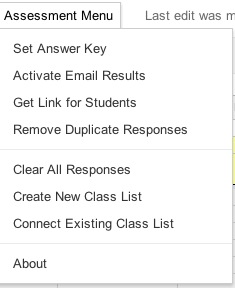
An update I've made to my templates is to now allow instant email results be activated from the menu rather than myself or others having to follow some tech-savvy like instructions. Here's two images of the menu, before and after the email trigger has been set:


Another feature I'm currently testing is course level table of contents creation, including folders and test filing in course and unit folders. I have it working but want to make sure before adding that to the public template. My vision on setting out with this update was that teachers would never again have to enter in a spreadsheet ID number, copy and paste answers or manually gather test links for students. (In presenting the material to other educators that always seemed to be the step that was the most difficult to follow. )They will still have to collect and give access to other course materials and activities though...

Friday, February 10, 2012

Finishing the race strong

Since beginning my teaching career I've always been concerned with reaching a tipping point where I am no longer open to new ideas or strategies. Where some new form of email, hardware or vegetable comes along that I just don't accept and the world passes me by--rendering my skill sets obsolete. I'm hesitant to complain about the new layout of Facebook just because it is different from what I'm used to.

I've come to believe that in general there is probably not an age that determines when a person gives up trying or considering a new idea but rather a mindset that has always been there--the idea that you can finally arrive at a level of contentment and no longer accept any new information. I'm sure you could get by just fine, but 'just getting by' doesn't interest me and I hope that it never does.

In guiding my students through mathematics I want to do so in a way that builds their intuition to apply the math in areas that have not yet been formally learned. A memorized algorithm or process done the exact same way as the teacher does not help them with this process. I need to reward students for applying their own ideas and understanding in new situations and more importantly provide them those opportunities.

If a student demonstrates understanding differently than what we expect them to, we should pause as educators and be open to the fact that we may not have considered all possibilities in an exercise we have provided in class.  Students like to see that something is new or novel. Collaboration seems to thrive in this type of situation.

We should never penalize a student for arriving at a correct conclusion different from the path we had thought of. Mathematics can be beautiful, connected and intuitive but will never appear that way to students if we make it seem like there is a recipe that must be followed every time. We too often spend time building our own personal understanding of mathematics and seldom give students that same opportunity.

I read a post this morning by Tim Kanold about a growth mindset vs. a fixed mindset and this resonated with where my thoughts have already been this week. Our tendency toward either mindset has nothing to do with age or experience and everything to do with who we are as individuals. I believe it can be changed but that can only happen through personal reflection.

Monday, December 5, 2011

Technology: If you lived here you'd be home by now.

Today I have a work day for the end of the trimester at school and I am reflecting on how much more focused it seems to be than in the past. I think that technology is to thank for this new-found focus. Last week the #pencilchat discussion was very therapeutic for me in being able to see some of our tech-frustrations through the lens of an older, more accepted, piece of "technology"--the pencil.

As I work today I thought of how things used to be when I first started teaching and these are some of the big time savers for me:
1. Gradebook is now web-based: In the past, grades were entered into a grade book program and much time on this workday was given to printing off grades and re-entering them into a different electronic program. Three or four other steps used to be required if I also wanted to post those grades online for parents and students and those grades were only as accurate as the last time I remembered to post. Don't get me wrong, there is still work involved on staying caught up on grades. 
2. Student assignments graded automatically: Staying caught up on grades is a lot more efficient--at least for the assignments that I can use an electronic grading system. Students submit work electronically with Google forms and I open a dashboard that shows their scores across the unit of study. Here I still have to enter the grades one at a time to my grade book because our grade platform does not believe there is a way to get a webpage to behave like a spreadsheet in pasting data columns--apparently they haven't heard of Google Spreadsheets? 
3. No seating charts: I don't make seating charts anymore for my students. (Click here for a post on how I do attendance without a chart). This is one area that seemed forced and too different from what happens in the real world. I find students are much more comfortable in working with people they are already know and I don't have them asking for a new seating chart anymore. It still is important to provide opportunities to work with a variety of students but seating charts don't have to deliver those opportunities (and seldom do). I do still have the occasional student that needs to be moved for the day to help them refocus but it isn't that often.
On my work day I have actually been able to spend time working on the next unit, creating a pretest, talking with other teachers in the building about the flipped classroom approach, current grading practices, and reflecting in this blog post. Perhaps these are the things that our work day is intended for? Without some help from my friend technology I would not have been as productive today.

Wednesday, November 2, 2011

What if meeting agendas worked more like Twitter?

I'm in a collaborative team for the Geometry course that I teach. Part of our collaborative meetings each week was spent recording our conversations in a Google document and then saving it into a shared file for others to access and view our discussions. We were making copies of a template and then saving those copies into a common folder. In wanting our team notes to be just as much for our growth as a job requirement I sought out to make a collaborative agenda that had a memory and was a little more...alive.
Agenda Feed View
Long and short of it, the agenda has some parts that are edited initially in a spreadsheet tab at the beginning of the year--things like our team SMART goal, Norms and Protocols. Agenda items are added in another sheet by either editing the spreadsheet itself or by sending a form response including the team member name and the agenda item to be discussed. Having the items loaded prior to the meeting time can be spent addressing the items and looking at our follow-up steps.
What I like most about the idea is that all our past discussions are housed in the same document and can be easily accessed. Having it in a spreadsheet also allows a "Word Cloud" chart at the top to pick out our team's most frequent words. If the words that are specific to student learning, great, but if they tend to center on our past weekend activities it's maybe a sign our group needs to refocus.
Word Cloud
The idea puts less pressure on having a single recorder for organizing the next meeting agenda and can be edited quicker if the form link is just a bookmark within a person's web browser or sent out in an email prior to the meeting. The most recent five discussions and follow-up items are displayed on the "Agenda Feed" tab of the spreadsheet. Multiple "meetings" within the week can just be recorded by the date discussed and will show up in the agenda feed. Past items can be viewed by clicking the arrows at the bottom of each chart (these charts can also be customized to display more items per view by editing the chart).
Future Agenda Items
There is far from anything earth-shattering in the structure but it's an interesting way of bringing some organization to discussions and meetings in a systematic way. Who has time to look back at past meeting agendas anyway?--Have them all in one place.
If you are interested in trying the idea you can get the template here. Once you open it to see the spreadsheet view, click on "See Responses" and choose "spreadsheet".

I have not tried yet but I'd be curious to hear if anyone has success in embedding the agenda feed in a website to publicly display the most recent agenda for their meetings.

Thursday, July 7, 2011

Maybe educators prefer flipped instruction and just don't realize it.

In past staff development sessions I have led (or been a participant) it can be difficult to move the group forward efficiently. To move fast enough for the tech-savvy people in the room and slow enough for people having trouble just getting logged in to their Google accounts.

I have uploaded and updated new instructions for using the Google Forms Assessment template I've created and have been using with my students over the last few years. I've also reorganized my blog to make it easier for followers just catching up on past posts to find the basics in implementing the tool in their own classrooms.

Despite handing out written instructions I've often heard "Written instructions don't work for me, I just need to see it".
I wonder if our students would say something similar about their textbooks... 
In anticipation of leading others through the process again I've created mini videos for each area of the assessment. The videos contain features and tools of the template as well as just getting the initial template setup for each individual teacher.

As I was sitting here thinking that over I realized that teachers, in staff development sessions, prefer flipped instruction. Moving at their own pace. Pausing, being able to stop when they need to think something over.  Seeing something again without having to slow others down or having the ability to move through things already known or understood.

As teachers many of us seem to prefer this mode of learning and that, for me, is a great argument for the need to provide those same opportunities for our students.

Friday, June 24, 2011

4 Reasons I'll recommend Twitter to my math dept in the fall

I began using Twitter a few years ago as a teacher. At first it was just a quick way to get information out to students without needing to edit my website each time. I still do that, using tags for the student related material, but have found great value in the past 6 months in the learning that I have acquired through Twitter as an educator. 

In my evolution of Twitter understanding, I have gone through what seems to be 3 phases of Twitter use.


At first it seemed like just another Web 2.0 tool that maybe could have some uses in the classroom. I played around with that, tweeting links to videos for students. In the past year I attended a technology conference and began seeing the value of interacting with teachers across the world. I was receiving professional development when I actually had time to try and apply it (sitting in my own classroom). The latest phase I feel that I am in is that to remain relevant as a teacher in a rapidly changing world, this is a tool that is nothing short of required to stay connected and up to date with educational research, thought and technology. Printed material is too slow and waiting until the following summer for new ideas and professional development will never accomplish educational reform. This is the grassroots movement that combines collaborative learning, action research and professional reflection all into 140 character doses.


With that said, here will be my 4 reasons for recommending Twitter to my math colleagues:
  1. Collaboration is only as good as what you and your partner can bring to the table. Extending the conversation to Twitter brings new perspective and ideas that you may never come up with on your own.
  2. Staff development, when separated from the classroom preparation in my own experiences, is seldom applied. Using Twitter I can look for topics and resources relevant to me when I have time to apply them. 
  3. Any time a professional conference is happening, not only will you know about it, you will get updates from people that are actually there and can engage in conversations and resource sharing from across the country. You would know what CCSS, PD, and PL were if you were on Twitter.
  4. In our building next year we are (finally) moving away from leaving class instructions on an automated telephone service. With staff now needing to update web pages, embedded Twitter feeds can be a fast way of doing so. Imagine the public's perception of teachers if they have a window into a school where the teachers are actively engaged with a world-wide education community.

If you are interested in getting started, here are some tips for you:
  1. As you first begin Twitter for professional purposes a good practice may be to observe others to see what the norms are first. 
  2. If you are using the account for professional purposes you probably shouldn't make posts about your child's first runny nose. 
  3. There does not seem to be anything personal about following (or unfollowing) someone on Twitter. If at any point you feel like the posts aren't relevant to you, cut them loose.
  4. Learn to use tags with your posts. If you have a question for other math teachers related to practices type the #mathchat tag in your message. Click here for some other tags specific to other areas. 
  5. I've also gone through and created a short list of people to follow to start off our building math department staff, you can access it here if you're interested.
David Wees has put together a great group of videos instructing others on how to get started in Twitter. (To view them, click here).