Showing posts with label grading. Show all posts

Wednesday, January 16, 2013

Parent letter update


Here is an update I sent to parents on our current class structure and the changes they may be seeing since the start of the year. 
It's far from the perfect plan but it is my reality right now based on some adjustments and continual reflection of what I'm teaching students (intentionally and unintentionally in class).

Parents (and students),
I wanted to update you on some changes you may have seen in the way students are working through each unit. I have tried to make our learning more focused on the big ideas for Geometry. Instead of textbook assignments, students are completing 'learning target packets' when we get to the point where they are ready for practice. The textbook can still be used to look over examples and get extra practice problems.
Our learning cycle now consists of:1. An introductory activity or investigation in class. We do this so students have some context to rely on when we get to more difficult problems within the learning target. A more hands-on approach makes the Geometry more real and interesting for all of us.2. Video lessons. Different than in the past, I don't assign videos to be watched until I feel students have been exposed to enough of an understanding in our class period. This allows them to have the context they need to be able to understand what they will see instead of introducing new ideas through the video.3. Additional practice or activities in class. We have used this time to do some more indepth problem solving, additional practice, work time for those who are ready and small group work for students identified through our warm-up question that still need some extra help. These days are often labeled as our work days and students receive instruction closely matched to their current level of understanding. Students also have the option of completing extension projects for each unit. If done well, the extension can be a way for a student to earn an A for the unit independent of their test scores.

Classwork, retakes and gradesStudents are given the solutions to their practice problems, either online or in a classroom binder. I do not collect the homework but students are to check their own problems and ask questions if they do not understand after seeing the worked out solution. The learning target practice is not entered into the gradebook. I was finding I was spending far too much time recording practice problems that weren't for grade and not enough time preparing meaningful learning activities for our time together in class.Online you will see a simplified gradebook for math. The only grades that will appear are quizzes and tests. If a student is missing a quiz or test they will be zapped, I will no longer be zapping for tests that should be retaken. (Any quiz score below 80% should really be retaken after additional learning and demonstration has been made of their understanding to me.)If a student needs to retake a test they need to:1) Complete a 'ticket to retake' worksheet, 2) rewatch the videos, 3) correct their missed test questions and 4) show me their notes they've taken from the videos.The grade at the end of trimester 2 will be the first grade used on the high school transcript. If you wish to have that grade be changed to a P that is an option now available and you can let me know. A grade of P will not affect their high school GPA but for college entrance it may be possible that the course should be taken again in high school for a letter grade to be present on the transcript.This got to be a long update but hopefully it helps in knowing what is taking place in class. Thanks for reading and please let me know if you have any questions.Sincerely,Andy Schwen


Thursday, January 3, 2013

Sending email results without the answer key


I've updated the email results script to allow for teachers to withhold correct answers in the feedback email students receive. By default, when the email results are triggered from the assessment menu, the correct answers will be sent to items missed.
To prevent this from happening you can now go to the Setup and Results tab in the individual test spreadsheet, click in the yellow cell (G2) and select "Don't Send Answers". Students will then receive an email with their score, their submitted answer and your feedback or standard identified with that item.

Friday, April 27, 2012

Finding encouragement in discouraging data

I'll share some quick data that has been encouraging in a time that has also been stressful with the end of the year approaching...

We (myself and two other teachers) had a quiz that students took last week that didn't go so well. In the past we've required students to have mastered the learning targets before taking the test (best practice) but with state testing, finals and the end of the year approaching all students took the test on the same day (reality). The results were interesting. On the homework quizzes students had 61%, 71% and 40% on the learning targets (including students that have done corrections). The learning targets on the test came through at 65%, 71% and 43% respectively. I talked with my classes yesterday and it was helpful in demonstrating why I have them do reflections and corrections on their misunderstandings in our learning cycle.

I also looked at some data from our previous unit and thought I'd also share this graphic showing growth across the pretest, test and retake (for those students that retested):

Tuesday, April 17, 2012

Send students email results with one click

I am presenting on some Google tools I've made and use in my own classroom and share through this blog at the Flipped Conference 2012 and have set out to make the setup process easier for all teachers.
Background info if you care: In the past month or so I have set out to learn how to use Google Scripts. The documentation is written for the non-programmer in mind (although I found having taken a college computer science class 13 years ago helpful) and offers MANY examples of how to implement specific functions. Basically anything you can possibly imagine in Google Apps can be done through the functions present there.
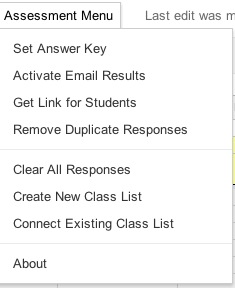
An update I've made to my templates is to now allow instant email results be activated from the menu rather than myself or others having to follow some tech-savvy like instructions. Here's two images of the menu, before and after the email trigger has been set:


Another feature I'm currently testing is course level table of contents creation, including folders and test filing in course and unit folders. I have it working but want to make sure before adding that to the public template. My vision on setting out with this update was that teachers would never again have to enter in a spreadsheet ID number, copy and paste answers or manually gather test links for students. (In presenting the material to other educators that always seemed to be the step that was the most difficult to follow. )They will still have to collect and give access to other course materials and activities though...

Saturday, March 10, 2012

Class list integration is now automatic!!


 So my wife is gone tonight which translates to me having all evening to learn more about Google Apps Scripts. I found some new functions tonight that should help new users of my template to be able to create and connect a class list file with nothing more than a menu selection.(Reduces one page of directions down to one click!) Users who download the template can now set up their class list by selecting "Create Class List" in the Assessment Menu. It will automatically create a spreadsheet titled "Class Lists" and connect it to the assessment template by its Key ID. (Teachers will still have to edit the class list with their student names.) The first row will be the class titles and it will accommodate up to 10 columns of student lists as before.
Very excited about this. Very excited.

Friday, March 9, 2012

Scripts: Knowing just enough to be helpful or dangerous?


First of all, there really isn't a chance that the script I've put together is 'dangerous' but the title is at least catchy if you're reading this. I've benefitted a lot from the MCQ and Remove Duplicates scripts created by Romain Vialard in the Google Apps Script gallery. I have always had them included in the templates I've shared but I have now put them together in one script and added a menu function that should load when you download the newest templates. (Click here for the script if you want to install it yourself on a template you already have.) I know very little about scripts and programming but was pretty good at piecing together html in the late 90's so this felt pretty similar to that.

The menu will allow you to clear all past student submissions, remove duplicate entries in one click, get the form url and also get the spreadsheet key if you're using one of my shared dashboards. I have the "Clear All Responses" option at the bottom because that wouldn't be good to accidentally click that one. I'm excited about having an integrated menu and hope that it adds some user-friendliness to the whole process.

If anyone knows how to set a trigger (see more here) from the menu or change this script so that a trigger is automatically set to run the 'sendemailonformsubmit' function that would be a huge help for many uncomfortable with setting a trigger. I'm not even sure if it's possible at this point.

If you're interested in collaborating on this it'd be really cool to have the email reports look more like the individual student results tab in the spreadsheet when they're sent out but that goes beyond my skills at this point.

Tuesday, January 10, 2012

Master Dashboard Navigation

For those already using my google forms assessment template (click here), and using my unit dashboard template (here towards the bottom of the page), this template will allow for a single file to navigate between multiple units to investigate classes and individual students. This could be used as a final piece once a course and all tests have been built. I've been using it the last week or so and it has helped cut down on (some) of the browser tabs I have open and saved time as well.

Thursday, December 22, 2011

Update on Flipclass Student Reflection and Assessment Results correlation

I surveyed my students again after completing another unit of study. I gave the same survey at the beginning of the year with less definite results than what have appeared mid-year in the graph below. I have correlated individual components of my classroom structure with actual student assessment results. Students self-reported their study habits and I asked them to only answer "yes" or "no" to individual questions if it was true 100% of the time in this past unit. It appears the most significant indicators of a successful end of the unit assessment are students that watch every video (0.28 correlation) and students that ask for help in class (0.2 correlation).

There are some positive things to note in the negative correlations as well I believe: 
  • The lower correlation behaviors are all behaviors that would normally be required in a traditional classroom (doing an entire homework assignment, reading the textbook section, taking notes). I see this as students are now able to do what it is they know they learn best with and abandon strategies that simply do not work for their learning style.
  • Outside of class study time reported by students was also low so I believe the flipclass approach is taking a large burden of time off of my students this year and placing the majority of their learning time inside of the classroom (although I wouldn't mind if they started studying more at home).
Thank you to all my loyal readers. Last February when I started blogging I never would have dreamed I'd be sitting at nearly 18,000 views today. Happy Holidays!

Monday, December 5, 2011

Technology: If you lived here you'd be home by now.

Today I have a work day for the end of the trimester at school and I am reflecting on how much more focused it seems to be than in the past. I think that technology is to thank for this new-found focus. Last week the #pencilchat discussion was very therapeutic for me in being able to see some of our tech-frustrations through the lens of an older, more accepted, piece of "technology"--the pencil.

As I work today I thought of how things used to be when I first started teaching and these are some of the big time savers for me:
1. Gradebook is now web-based: In the past, grades were entered into a grade book program and much time on this workday was given to printing off grades and re-entering them into a different electronic program. Three or four other steps used to be required if I also wanted to post those grades online for parents and students and those grades were only as accurate as the last time I remembered to post. Don't get me wrong, there is still work involved on staying caught up on grades. 
2. Student assignments graded automatically: Staying caught up on grades is a lot more efficient--at least for the assignments that I can use an electronic grading system. Students submit work electronically with Google forms and I open a dashboard that shows their scores across the unit of study. Here I still have to enter the grades one at a time to my grade book because our grade platform does not believe there is a way to get a webpage to behave like a spreadsheet in pasting data columns--apparently they haven't heard of Google Spreadsheets? 
3. No seating charts: I don't make seating charts anymore for my students. (Click here for a post on how I do attendance without a chart). This is one area that seemed forced and too different from what happens in the real world. I find students are much more comfortable in working with people they are already know and I don't have them asking for a new seating chart anymore. It still is important to provide opportunities to work with a variety of students but seating charts don't have to deliver those opportunities (and seldom do). I do still have the occasional student that needs to be moved for the day to help them refocus but it isn't that often.
On my work day I have actually been able to spend time working on the next unit, creating a pretest, talking with other teachers in the building about the flipped classroom approach, current grading practices, and reflecting in this blog post. Perhaps these are the things that our work day is intended for? Without some help from my friend technology I would not have been as productive today.